from pytamaro import *

# TODO: Create an 8 × 8 RGB colour grid with PyTamaro
#
# Requirements:
# - Create a grid of coloured rectangles (8 rows, 8 columns)
# - Vary the red and green values across the grid
# - Keep blue at 0 for simplicity
# - Each cell should be 40×40 pixels
#
# Hints:
# - Use rgb_color(r, g, b) to create colours
# - Use rectangle(width, height, color) to create rectangles
# - Use beside() to place rectangles horizontally
# - Use above() to stack rows vertically
# - Calculate RGB values using: value = row * step or col * step
# where step = 255 // 7 (to get 8 evenly-spaced values from 0 to 255)15 Image Representation in Computers
Images are composed of shapes and colours. We have observed this through our work with the PyTamaro library. However, this experience does not answer the question of how shapes and colours are represented in computer systems. While humans perceive colours visually, computers must encode them as numerical data.
Let us begin with the colour representation.
15.1 Colour Representation
To display a colour on a computer screen two aspects must be considered:
- The colour model, and
- the colour encoding.
15.1.1 The Colour Model
At a theoretical level, three distinct colour models exist: light-based additive colour models (RGB), pigment-based subtractive colour models (CMYK), and prerceive oriented models (HSL/HSV).
For computer screens, the RGB model is predominant whilst for printers we use the CMYK model. The HSL/HSV model is used in image processing software. Because this is a computer science class, we will focus on the RGB model. The abbreviation RGB stands for red, green, and blue. If the beams of a red, a green, and a blue torch are directed at one spot, the colour of that spot will be white where the three beams overlap, as illustrated in Figure 15.1.
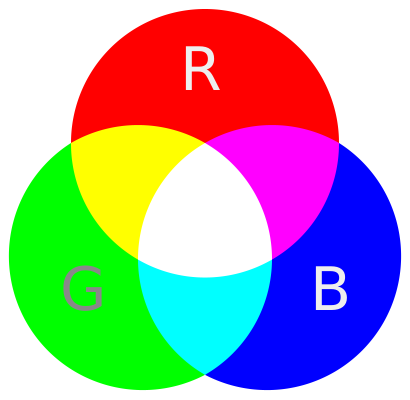
IIn computer screens, the torches are replaced by a grid of red, green, and blue LEDs. A group of three LEDs (one red, one green, one blue) forms a single pixel on the screen. Colours are created by varying the intensity of light emitted by each LED in the pixel group.
A typical computer screen LED can emit light at 256 different intensity levels, ranging from 0 (off) to 255 (maximum brightness). Since each pixel contains three LEDs, and each LED has 256 possible intensity levels, the total number of displayable colours is:
\[256 \times 256 \times 256 = 256^3 = 16{,}777{,}216\]
This is called 8-bit colour depth (or 24-bit true colour) because each of the three colour channels (red, green, blue) uses 8 bits to represent its 256 intensity levels. The term “24-bit” comes from the total: \(8 \text{ bits} \times 3 \text{ channels} = 24 \text{ bits}\) per pixel.
15.1.2 Colour Encoding
The above explanation leads to the question of how the numerical colour representation is encoded in computer systems.
RGB colour values can be represented in two common notations:
- Decimal RGB notation: Three integers ranging from 0 to
- For example, RGB(10, 255, 100) represents a vivid green.
- Hexadecimal notation: A six-digit hexadecimal number preceded by
#. For example,#0AFF64represents the same vivid green.
In hexadecimal notation, each pair of hexadecimal digits represents one colour channel. The first two digits represent the red channel, the next two the green channel, and the last two the blue channel:
#0AFF64breaks down as:0A₁₆ = 10₁₀ (Red)FF₁₆ = 255₁₀ (Green)64₁₆ = 100₁₀ (Blue)
This hexadecimal notation is preferred in web development and graphic design because it is compact and aligns with how colours are stored in computer memory (8 bits = 2 hexadecimal digits per channel).